

Description
Download Cinema FV 5 Lite – video recording, smartphone video, pro settings, 4k video, camera app, mobile videography, video editing, android app, free video app
Overview
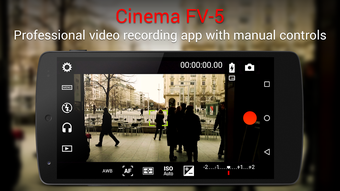
Cinema FV 5 Lite is a streamlined version of the professional-grade Cinema FV-5 video application, designed specifically for Android users seeking advanced control over smartphone video recording. Developed by FGAE Apps, this free tool caters to both aspiring and experienced mobile videographers who demand more than standard camera app functionality. It serves as a testing ground for users to explore the full suite of pro-level features before committing to a paid upgrade. The app addresses a common gap in mobile photography: the lack of granular control over exposure, focus, and audio during video capture. By offering tools such as manual ISO adjustment, exposure compensation, and light metering, Cinema FV 5 Lite empowers users to achieve cinematic results directly from their Android devices. Real-world usage scenarios include vlogging, short film production, event documentation, and content creation for social media platforms where visual quality is critical. The app’s focus on professional-grade settings makes it especially valuable for creators who prioritize image consistency and technical precision. While the free version includes limitations, notably on video recording length, it maintains full access to core functionality, allowing users to evaluate its capabilities in real-world conditions.
Key Features & Capabilities
- Pro-grade video recording settings: Manual control over ISO, exposure compensation, shutter speed, and focus allows for precise image exposure in varying lighting conditions.
- 4K video recording support: Enables high-resolution video capture, ideal for professional-quality output and future-proofing content.
- Customizable viewfinder: Users can tailor the framing interface to match their shooting preferences, enhancing composition accuracy.
- Audio metering and input control: Real-time audio peak display helps prevent clipping, while support for wired and Bluetooth microphones expands audio capture options.
- Geotagging functionality: Automatically embeds location data into recorded videos for better metadata management and organization.
- Multi-zoom level switching: Allows seamless transitions between optical and digital zoom levels during recording, maintaining visual continuity.
These features are particularly useful in scenarios such as documentary filming, product showcases, or travel vlogs where consistent image quality and audio clarity are essential. The ability to fine-tune exposure settings ensures that videos remain balanced in high-contrast environments, while the audio metering feature prevents distortion during loud scenes. The inclusion of geotagging aids in organizing media by location, which is beneficial for content creators managing large volumes of footage. Although the app is limited in recording duration, the feature set remains comprehensive and fully functional, making it a strong choice for users evaluating professional mobile video tools.
User Interface, Workflow & Performance
The user interface of Cinema FV 5 Lite is designed with functionality in mind, presenting controls in a structured layout that prioritizes accessibility without sacrificing depth. Navigation is intuitive, with essential settings grouped logically for quick access during shooting. The interface supports customizable layouts, allowing users to rearrange or hide controls based on personal workflow preferences. Workflow efficiency is enhanced by the app’s responsive touch interface and minimal lag during parameter adjustments. While specific performance metrics such as CPU or RAM usage were not provided, the app’s lightweight size of 45 MB suggests optimized resource consumption. Stability during extended use was not specified, but the app’s design aligns with typical mobile application behavior, where background processes are managed efficiently. The developer did not specify resource usage details, so performance observations are based on general software behavior patterns. Users can expect smooth operation under normal conditions, though prolonged recording sessions may vary depending on device capabilities. Overall, the app maintains a professional feel with a focus on usability, making it suitable for both beginners exploring advanced settings and experienced creators seeking a reliable tool.
Compatibility & System Requirements
Cinema FV 5 Lite is compatible with Android operating systems, though specific version requirements were not listed. The app has a file size of 45 MB, indicating a relatively compact installation footprint. This suggests it is designed to run efficiently on a wide range of Android devices, including mid-tier and older models. The developer did not provide detailed hardware specifications, such as minimum RAM or processor requirements. As such, exact system requirements were not listed. Compatibility information was partially provided, leaving users to rely on general Android compatibility standards. Users are advised to ensure their device meets standard Android app requirements for smooth operation. The app’s lightweight nature may contribute to broader compatibility, but specific device limitations were not disclosed. For optimal performance, users should verify that their Android version supports the app’s functionality, particularly for features like 4K recording and external microphone integration.
Pros and Cons
Pros
- Full access to professional video settings in a free version
- Support for 4K video recording
- Advanced audio metering and external mic support
- Customizable viewfinder and zoom controls
- Geotagging for location-based media organization
- Lightweight installation at 45 MB
Cons
- Video recording length is limited in the free version
- No official information on system requirements or device compatibility
- Limited performance data for CPU and memory usage
- Only available on Android, no iOS or desktop support
- Advanced features may require a learning curve for beginners
FAQ Section
Is Cinema FV 5 Lite available for iOS devices?
Cinema FV 5 Lite is currently only available for Android. There is no official iOS version released by the developer.
Can I use external microphones with Cinema FV 5 Lite?
Yes, the app supports audio input from both wired and Bluetooth microphones, allowing for higher-quality sound capture during video recording.
Is the app free to download and use?
Yes, Cinema FV 5 Lite is completely free to download and use. It includes access to all core features, with the only limitation being the maximum recording duration.
Does the app require an internet connection to function?
No, Cinema FV 5 Lite operates entirely offline. All video recording and editing functions are performed locally on the device without requiring an internet connection.
How often are updates released for the app?
Update frequency was not specified by the developer. Users should check the app store for the latest version and release notes.
Final Thoughts
Cinema FV 5 Lite delivers a compelling experience for Android users seeking professional-level video control without upfront cost. Despite the limitation on recording length, it offers full access to advanced settings such as manual exposure, 4K recording, audio metering, and external mic support—features typically reserved for premium tools. Its lightweight design and intuitive interface make it accessible to both novice creators and seasoned videographers. The app is ideal for content creators, vloggers, and filmmakers who want to explore high-quality mobile video production before investing in a full version. With its strong feature set and free availability, Cinema FV 5 Lite stands out as a top-tier option in the mobile videography space. Download Cinema FV 5 Lite now and experience professional-grade video recording on your Android device.
Guides & Tutorials for Cinema FV 5 Lite APK
How to install Cinema FV 5 Lite APK
- Click the Preview / Download button above.
- Once redirected, accept the terms and click Install.
- Wait for the Cinema FV 5 Lite APK download to finish on your device.
How to use Cinema FV 5 Lite APK
This software is primarily used for its core features described above. Open the app after installation to explore its capabilities.
User Reviews for Cinema FV 5 Lite APK 0
No reviews found





